
Tuesday, 13 December 2016

CD Digipack Mock up Part 3

CD Digipack Mock up Part 2

I started putting together my mock up I started off with simple font use and started thinking about the positioning.
Planning CD Pack Mock up
In today's lesson I started making my CD Front Page and Back the first step to this is organising the measurements and here is my first steps.


Saturday, 3 December 2016
Friday, 2 December 2016
Research and Team meeting for CD cover
Today in lesson we had a meeting about the type of cd we want to create for our music video. We discussed the type of themes we want to display on the front cover. We discussed that we may use the studio to shoot in because we can create background patterns which correlate with our genre but we will keep it western. We looked at different cd single covers and we found that the majority of the images were shot in a studio but none had a plain white background all had different colours and some patterns as this genre could be described as vibrant and tropical meaning it would have a vibrant theme.
Thursday, 1 December 2016


Friday, 25 November 2016
Tuesday, 22 November 2016
Wednesday, 16 November 2016
Team Discussions and main focus
In today's lesson we finished the order in which our scenes were in and also the colour correction, Our video looked good but we wanted to make it more intriguing so we focused mainly on transitional effects and our favourite one which was used effectively was the cross zoom at the beginning of the music video.

Tuesday, 15 November 2016
Colour correction
We have nearly finished putting together our scenes so now we can focus as a group on other conventional factors of a music video which is colour. As we did film in different locations we can see the difference in lighting, whiteness ad saturation meaning this will have to be balanced out throughout the video. We tried to use one filter for all our scenes but this did not work as the scenes we done on leak street were in a tunnel meaning we could not use one filter as we did not receive natural daylight but instead there were lights in the tunnel which meant there was more saturation in the tunnel.

Friday, 4 November 2016
Team discussion
Today the team discussed our ideas towards the music video.This enabled us create a range of ideas as individuals brought different aspects in which they specialise in it best. This was really effective because everyone was able to play their part in making the video, everyone opinion was heard meaning the video would be successful in a sense where there were individual ideas that could be carried out even when the group are not together.
Julia focused on the dancing and the angels of the dancing making it suit the beat when cutting and scene order so it is not a big contrast when scene changes
Iptihal focused on the lip syncing and colour correction
Jesse (me) focused on transitional effects and cuts
Angel focused on colour correction making it look balanced throughout the music video and establishing shots

Julia focused on the dancing and the angels of the dancing making it suit the beat when cutting and scene order so it is not a big contrast when scene changes
Iptihal focused on the lip syncing and colour correction
Jesse (me) focused on transitional effects and cuts
Angel focused on colour correction making it look balanced throughout the music video and establishing shots
Tuesday, 1 November 2016
First editing session
Friday, 28 October 2016
Final Shoot at Olympic Park
Today we went out to shoot because we realized that we did not have enough lip syncing scenes of the actor(me) and that there were too much dancing in the video. Even though the genre is mainly based around dance, there is lip syncing in the videos which has inspired us so for us to follow conventional aspects we have to take everything and not be selective as we want to make it as professional as we can. Today there were some shots of the dancers but this time it was the dancers with the actor. The lighting for the shoot was really good although it was windy we still caught natural sunlight which will be effective as some of our scenes are bright meaning it will balance out the contrast in the video.
Thursday, 27 October 2016
Pictures from Olympic shoot


Olympic Park shoot
We went to shoot in Olympic park as our plan with the green screen was not effective because of the tone colouring problem. We took a range of different shot types low Angel, high angel, mid shots and wide shot which was really good because the dancers had loads of space to dance. The lighting was good as this was done at in the morning. We also done establishing shots as we thought it would be professional to have scenes that are not all based around the actor and dancers.
Wednesday, 26 October 2016
Leake Street shoot
Today we went to shoot at leak street located in south London Waterloo, this shot was mainly based on the actor acting as the artist. The reason why we shot there is because of the graffiti art which is very colourful and has a linked contrast with the genre we are doing. The weather was not good and because it started getting dark early it was really hard to find good lighting. We took establishing shots to show where we shot the video to show the scenery as it gets more intriguing when its not only the dancing and the actor . In the shot we had one dancer because in the other shoot in the Olympic park it was only danced based so the actor (me) that was acting as the artist in the shoot we focused on lip syncing which had to be prioritised even though the genre is afrobeat and is mainly dance but it still has some aspects of the artist lip syncing and because we want it to look professional we went along with what we saw.
Tuesday, 25 October 2016
Pictures from first shoot


Saturday, 22 October 2016
First shoot
Today we had our first actual shoot in the studio. It went alright but because of lighting problem with the green screen it was not easy. We noticed that we have to light the background first making sure there are no shadows in the green curtains as it folds. This was hard because the curtains are not straight meaning there we're shadows. So we kept on adjusting the lighting till the green curtain was well lit. After we lit the background we then had to make sure the lighting was good on the dancers and actors. This was problematic because we had to keep on changing it till both the actor and dancers were lit right as well as the green curtains.We tried making to make the green work but this was very difficult due to it being a curtain as it did not stay straight meaning there were shadows and this would cause there to be different tones of colours when editing which would of been very problematic as it would not look professional.
Putting Ideas to test

Today's lesson we put our plans to test and tried to make the green screen effect work but it did not go so well because off the shadows showing. Which effected the tone of the colours as it left patches of darkness meaning it was not all toned. So tried to make use of some of the scenes which were mainly me performing as the artist which there were not shadows that were visible. But this is good because we done this early meaning we have time to go out and film. Also some of the scenes that worked with the green screen we could use and cut into it but this may not work because of the contrast could be too different meaning it would not correlate and this may look unprofessional. As In my opinion filming outside and then in the studio it will not look right because the video will not have a set theme to it.
Costumes
1. Costumes: Lead Male·
Jacket (Bomber)·
Trainers·
T-Shirt·
Jeans
Male Extras
Jacket (Bomber)·
Trainers·
T-Shirt·
Jeans
Male Extras
· Hoodie (Optional)
· Jacket (Bomber)· T-Shirt·
Female Dancers
ANYTHING STYLISH*CHECK CLOTHES FOR APPROVAL*
Female Extras·
Top·
Jeans·
Trainers·
Jacket 2.
Props:·
Phone·
Watch 3.
Makeup· Keep it natural or glam (whatever we prefer)
Friday, 21 October 2016
Test Run


Thursday, 20 October 2016
Reeces
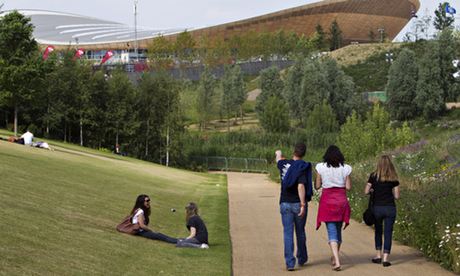
Olympic Park: I will be filming in Olympic park as it has nice scenery which will look good with the dancing also it has loads of space for the dancers to perform meaning they will not be restricted when dancing.
Leake Street: We will be also shooting in Leake street in the tunnel and outside of the tunnel because it will enable us to create contrast between the scene and it the graffiti may intrigue the audience as we are planning to do some establishing shots

Leake Street: We will be also shooting in Leake street in the tunnel and outside of the tunnel because it will enable us to create contrast between the scene and it the graffiti may intrigue the audience as we are planning to do some establishing shots

Wednesday, 19 October 2016


Team roles
Angel : talent release form + job roles
Iptihal : call sheets + recees
Jesse : risk assessment + permission to shoot
Julia : props, costume, make up (Not Needed)
Cinematography:iptihal + angel
Editing : everyone
Director: angel
Location Manager : jullia
Lighting : iptihal Set
Designer : Jesse
Lead role :Jesse
Storyboards : everyone
Lyric annotations : everyone
Iptihal : call sheets + recees
Jesse : risk assessment + permission to shoot
Julia : props, costume, make up (Not Needed)
Cinematography:iptihal + angel
Editing : everyone
Director: angel
Location Manager : jullia
Lighting : iptihal Set
Designer : Jesse
Lead role :Jesse
Storyboards : everyone
Lyric annotations : everyone


Tuesday, 18 October 2016



Team meeting
We had a team meeting and we were discussing the locations we plan to shoot at and we got advice from an assistant teacher that was helping out that lesson. He advised us that us filming our music video in a studio then going on the streets to film may create a great contrast but may affect the look of it not looking professional. The advise was true as we tried of thinking about other music videos that had filmed in a white background studio then in the streets, we could not think of any professional videos that have done this. Rather it was either they filmed in the streets or a studio but it was not both so we did take this inconsideration. We got shown an example of other music of another student's music video and how they edited their backgrounds effectively.
Saturday, 15 October 2016


Monday, 10 October 2016


Tuesday, 4 October 2016


Subscribe to:
Comments (Atom)